DASHself

DASHself Functional Design Document

BACK

DASHself

DASHself leverages many of the rules and workflows within DASHcentral, but there are design considerations that should be reviewed to ensure your patient self-scheduling workflow meets your expectations. This document outlines a description of those features so you can choose the option that works best at your organization The implementation team will utilize a combination of these design decisions and your data template to design, configure, and test your DASHself environment. You will complete the grid by filling out your decisions in the third column as seen in the attached file. For any questions or clarifications, please reach out to your Client Operations Manager.

DOWNLOAD PDF HERE

DASH Marketing Recommendations: Introducing it to Your Patients

BACK

Introduction

Implementing DASH is more than simply purchasing a new technology subscription. In order to use the solution to truly transform the patient experience, it requires organization-wide collaboration internally, and a clear plan for roll-out and communication externally. In this guide we outline sample plans and resources that you can use to ensure a successful DASH implementation. The best way to use this document is as a template version of a checklist. Pick what you think is important, plan what is accessible via your existing marketing and communication channels, and modify as needed for your practice.  

Set A Goal

Setting a goal allows you to determine which tactics to deploy. Since you have limited time (even if you have unlimited money), it is important to focus only on tactics that will help you meet your goal. We outline some example goals below so you can pick one or two to align your campaign around:

  • Potential Operational Goals

    • DASHin:

      • At least 50% of patients overall can complete mobile check-in 

      • Reduce wait-time to under five minutes for 80% of patients

      • Collect co-pays from at least 50% of patient prior to appointment visit

    • DASHself:

      • At least 12% of patient appointments are self scheduled

    • DASHconnect:

      • At least 75% of patients are confirming, cancelling, or rescheduling appointments

  • Potential Financial Goals

    • DASHin:

      • Drive patient volume using mobile check-in as a differentiator, increasing utilization by 5% 

      • Increase POS collections by 10%

  • Potential Experience Goals 

    • DASHin:

      • Institute standardized patient intake experience across practices

    • DASHconnect:

      • Increase patient NPS by 10 points over a 3-month period 

Segment Your Audience 

Understanding your audience will help you execute on a successful launch for DASH. Messages and promotional activities that work for one segment of your audience may not be well suited for others. We advise clients to start with the following audience segment. Yours may be different.

  • Existing patients: these are patients that have recently visited your practice and are likely to visit you in the near future. 

  • Past or new patients: these are patients that have not recently visited your practice and may be a good target audience for patient acquisition.  

  • Employees: your internal teams can ensure that patients feel empowered and that their inputs are received, acknowledged, and appropriately addressed. Ensure they’re up to speed on the offerings, ways to communicate the information to your patients, and commonly asked questions.

  • Community stakeholders and influencers: these may be a smaller group of individuals that can help spread the word about your efforts on meeting consumer expectations to the benefit of your practice.

Plan Your Promotional Tactics

To get started we recommend the following tactics to ensure that your mobile check-in solution is adopted quickly and helps you meet your goals. You may already be working with an agency that can provide more tailored material for you but if that’s not the case, you’ll find some of these resources particularly valuable. 

  • Press Release - publish a press release highlighting your selection of a mobile check-in solution (audience: influencers) See Radix Health press release template

  • Contact reporters - use your local connections to secure an interview about your mobile check-in solutions to ensure that the impact of your press release is amplified (audience: influencers)  See Radix Health sample email

  • Communicate with your teams about the investment in DASHin and how they can help (audience: employees) See Radix Health sample email

  • Feature an image on the homepage of your website announcing mobile check-in or contactless check-in (audience: existing patients) See Radix Health website image example 

  • Create a landing page to highlight your investment in a digital check-in solution. We have created some material you can use as a starting point. See Radix Health website landing page template  

  • If you have an automated voice recording that plays when patients are on hold while scheduling an appointment, for example, update the messaging to include an announcement about activating mobile check-in (existing patients) See Radix Health sample script

  • If you currently have a monthly newsletter that goes out to all patients, include an announcement about activating mobile check-in (audience: existing or new patients) See Radix Health sample messaging

  • If you frequently run postcard campaigns to residents in certain zip codes, run a campaign around activating mobile check-in (audience: existing or new patients) See Radix Health postcard template

  • Do you have a patient advisory board? If so, ask them for ideas since they will have more creative and contextually relevant tactics and will amplify your message (audience: influencers)

  • Social media - plan a social media campaign that includes images of mobile check-in (audience: employees, existing patients) See Radix Health social media image templates

  • Get your providers on board. If they mention to patients that they are excited about mobile-check in, patients are likely to react positively and, in turn, tell others

  • Modify your appointment reminders to include messaging on digital check-in. When patients are scheduling an appointment, tell them that you will be sending them a link to complete their form electronically. See Radix Health sample messages

  • In-office artwork: Use posters and placards in your practice to advertise mobile check-in See Radix Health poster template

Plan Your Rollout

Not everything needs to or even should be activated at once. We recommend creating a roll-out plan as follows:

  • Three months before Go-Live: 

    • Review your check-in experience across your locations and create a plan for what it should look like. Too often we find that practices have disparate procedures in different locations. Sometimes, these add complexity to every part of roll-out without adding any value to the practice or benefit to the patients. Complexity isn’t always bad, just make sure that it’s worth the drag. 

  • One month before Go-Live: 

    • Ensure that your internal stakeholders are aware of the upcoming roll-out. 

    • Set the expectation that you will need their help in a successful roll-out.

    • Establish a point-person internally to answer stakeholder questions and concerns.  

    • Identify reporters to reach out to for a story around digital check-in.

    • Build social media posts, emails, and other assets, communications, and collateral to prepare for your roll out.

  • At Go-Live: 

    • Get your internal stakeholders excited. Their enthusiasm will be far more effective than any poster we can co-create. 

    • Appoint one person to collect, review, and share feedback on the mobile check-in process from clients and users across locations. 

    • Publish press release and push social media posts live.

  • Two weeks after Go-Live

    • Begin addressing feedback from patients. Identify any areas to fine tune and re-share via social, email, or other channels as appropriate.

  • One month after Go-Live

    • Share KPIs and success metrics internally. Pick one or two numbers that everyone can rally around. 

  • Six months after Go-Live

    • Review KPIs and create collateral highlighting positive patient feedback for subsequent campaigns.

  • One year after Go-Live: it’s time to take those posters down, if you haven’t already.

Templates & guidelines

Found in Appendix of linked PDF

DOWNLOAD PDF HERE

DASH 21.1 Update: DASHself Patient Matching Algorithm

< BACK

Overview

The DASHself Patient Matching Algorithm provides a thorough way to match patient information with their existing patient record and update it accordingly. This process reduces the likelihood of creating duplicate patient entries in your system. This page contains additional information about the matching process, specifically what is used to find a matching record.

image3.png

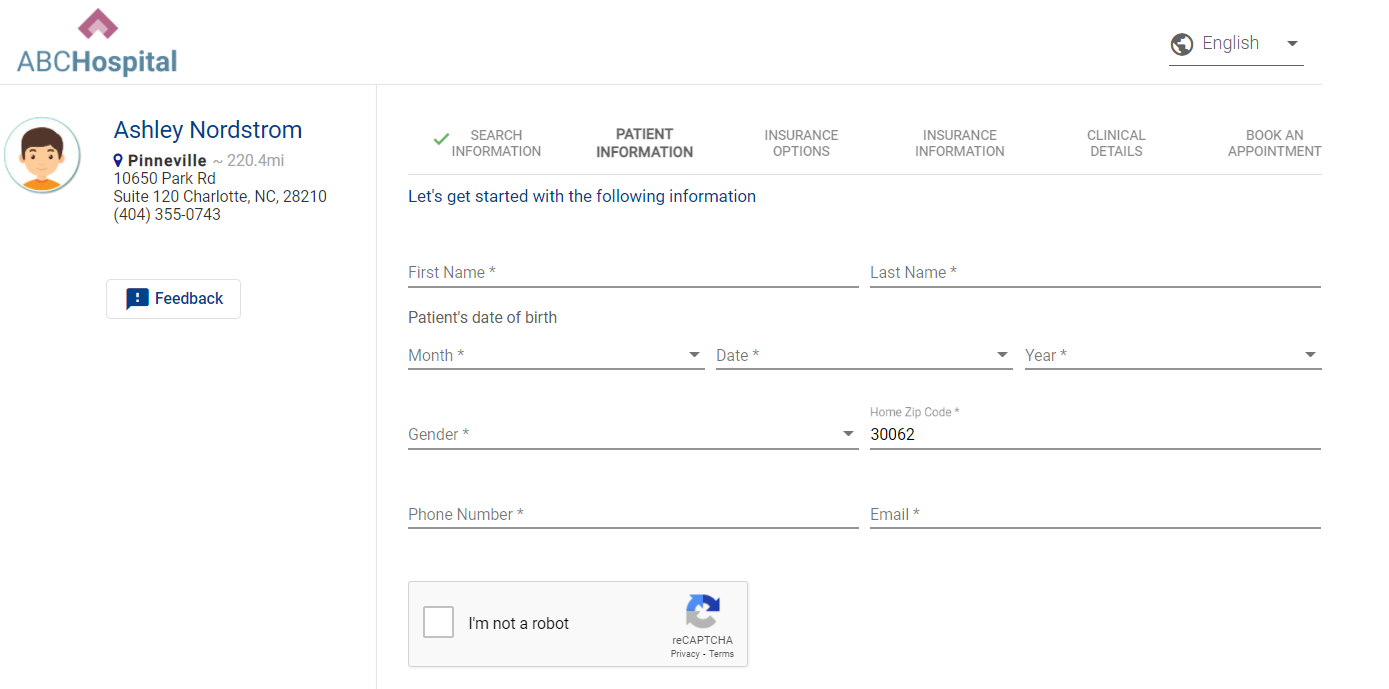
Patient Enters in Demographic Information

Our patient matching algorithm uses a combination of the six pieces of demographic information collected on the first screen.

  • Patient First Name

  • Patient Last Name

  • Date of Birth

  • Patient e-mail address

  • Zip Code

  • Phone Number

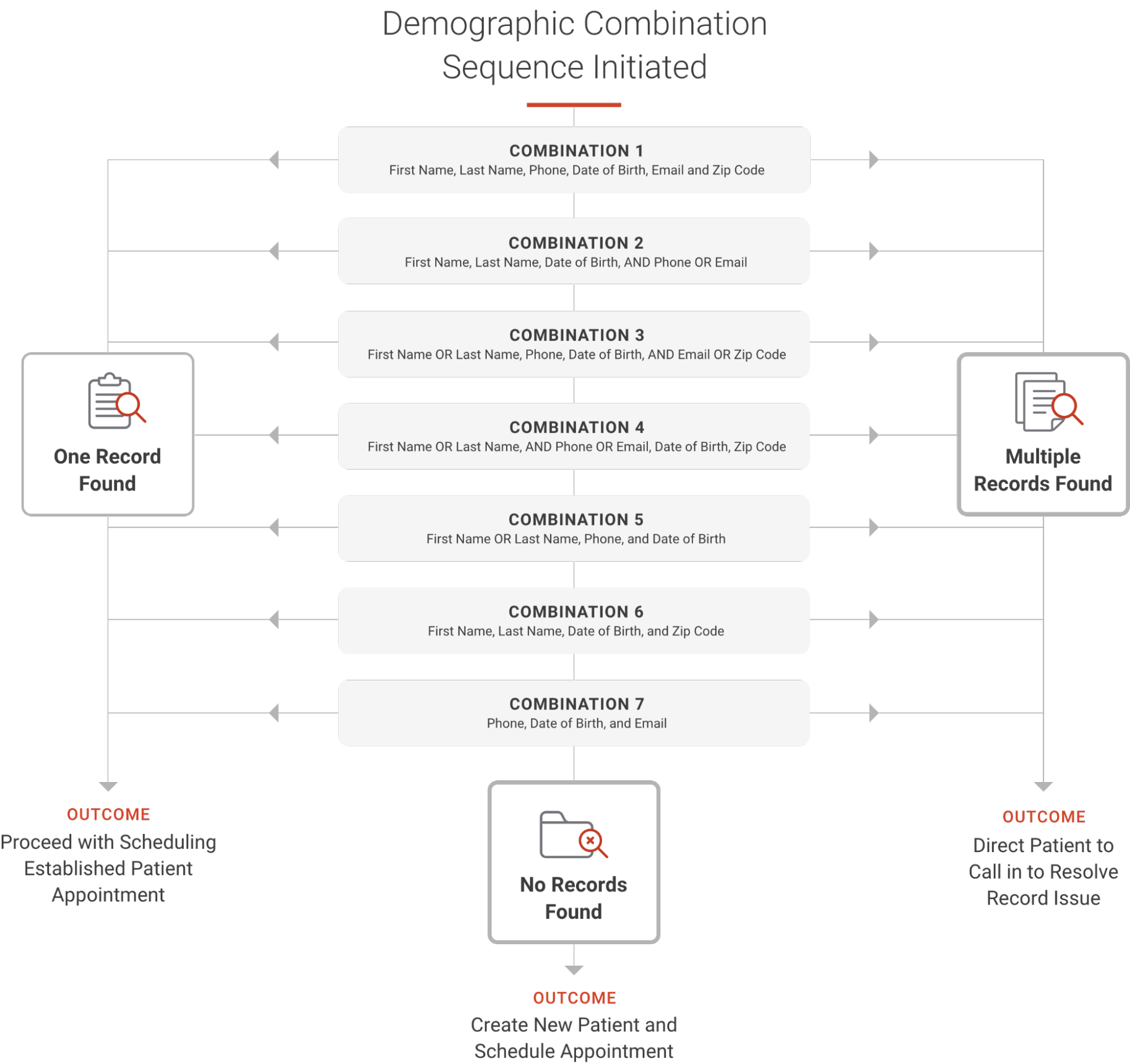
In the logic below, you will see how our algorithm attempts different combinations of the demographic fields. We try seven combinations that can lead to the below results. When we try the first combination, if no record is found, we will try the second combination, and so on until all are complete. We try multiple combinations to ensure we are not erroneously creating new patients.

image2.png

General Info & FAQs

When opening up access to patients, we cannot account for every scenario. Please see the below notes on this algorithm.

  • We do not account for nicknames. We will search for the name that exists on the patient record.

  • When searching across phone numbers, we are searching home, cell, work.

  • We do not reference historical demographic information in our algorithm. For example, if a patient updated their address three months prior, our algorithm cannot reference this information.

  • We do not collect SSN in DASHself. Our data shows that many patients abandon the process due to the risk of this not being secure.

  • This algorithm does not differentiate if any of the fields are NULL or do not contain the data. It requires the appropriate values in the fields. It works when the value is present on the above-mentioned fields.

  • Once the right match is found with the few of the data that are different and are not considered in the algorithm above, the system only updates those values once the patient reaches the last screen and fills in the additional demographic information.

Q: What isn’t accounted for in the patient matching algorithm?

A: The matching is created to account for as many scenarios as possible to reduce the likelihood of duplicate patient entries being created in your system. For example, we do not have the ability to account for misspellings. If a patient accidentally spells their name wrong, there is a risk of a new patient record being created. Additionally, nicknames aren’t included -- just the name existing on the patient record.

Q: What phone numbers are included in the phone matching?

A: Home, cell, and work phone numbers are searched.

Q: Does the algorithm reference historical demographic information?

A: Only current information is searched for matching. For instance, if a patient updated their address three months prior, it’s not referenced in the algorithm.

Q: Do you collect SSNs in DASHself?

A: No, data shows that many patients abandon the process due to a perceived security risk if SSN is requested.

Q: How does the patient matching algorithm respond to empty fields?

A: This algorithm does not differentiate if any of the fields are NULL or do not contain the data. It requires the appropriate values in the fields, matching when the value is present on the above-mentioned fields.

Q: When is the patient’s data actually updated in the system?

A: While the patient enters information early on in the registration process, the patient’s data is not updated until the entire scheduling flow is completed.  This allows for additional information to be collected before updating the patient record.  This is true for both updating a matched patient record as well as when a new (unmatched) record is created.


Need a PDF version to share with your team for training?

DOWNLOAD HERE