21.1 Updates

DASH 21.1 Service Pack #1 Updates

< BACK

DASH 21.1 Service Pack #1 contains bug fixes and minor enhancements for the DASHcentral and DASHself applications. Please contact your Client Success Manager with any questions. 

DASHcentral

Appointment Scheduling

  • Fixed an issue that allowed some “view-only” users to cancel and reschedule appointments.

  • Fixed a bug that was causing some patient Q&A responses not to display in the Appointment Details page. 

  • Fixed an error causing the Today’s Appointments page not to show the total number of appointments scheduled for the day.

Alert Display

  • Patient alerts (e.g., bad debts, insurance verification) now display in all patient search results.

  • An error will now display if an Alert update was unsuccessful. 

Provider & Specialty Fixes

  • “Inactive” providers are no longer shown in the “referring providers” field on the demographics page. 

  • ‘Inactive’ specialties will no longer display during appointment search.

  • Primary Care and Referring provider phone numbers now display consistently when adding or updating a patient record. 

  • When a referral task is created, the Referring Provider will automatically populate the same field in the Patient Demographics page. 

  • Linked providers (e.g., MD-PA pairs) will now be auto-selected after the “Search” action, in addition to “Select.”

Other Fixes & Enhancements

  • Removed a restriction that prevented all relevant insurance plans with similar names from displaying in search results. 

  • Resolved an issue related to the duplication of Recall column headings, and ensured the display of relevant recall records based on search parameters. 

  • Resolved an issue affecting the parking wait time and the clinic wait time displays.

  • Fixed a bug that required a “Suffix” field entry on the “User Set Up” page.

DASHself

Date & Time Selection

  • Fixed a bug that caused the clinic logo not to display on some Rescheduling, Canceling, or Confirming appointment screens. 

  • Fixed a bug to allow patients belonging to multi-provider groups to schedule online appointments. 

  • When rescheduling an appointment, patients’ preference questions will no longer be asked a second time; they will be stored and reused for the new appointment. 

  • Appointment notes from previously scheduled appointments will now copy to the rescheduled date & time. 

Provider Selection

  • A fix has been made to enable adding provider photos for DASHself scheduling. 

  • Fixed a bug to consistently display images for associated providers. 

  • DASHself will no longer be able to override the “Referred Provider” and “Preferred Facility” fields in the patient demographics page. These fields will only be updated if the patient is new to the clinic. 

  • If a provider has only telehealth appointment availability, these time slots will now appear automatically.

  • Repaired an issue causing some provider preference questions to display twice. 

  • Improved DASHself provider search performance by reducing the time window for available appointments from six months to three months. 

Visit Reason Selection

  • Improved the rendering of Visit Reason and Insurance Plan descriptions to eliminate truncation on mobile devices. 

  • Users can now manually set the order in which visit reasons appear in the dropdown menu.
DOWNLOAD HERE

DASH 21.1 Update: DASHself Patient Matching Algorithm

< BACK

Overview

The DASHself Patient Matching Algorithm provides a thorough way to match patient information with their existing patient record and update it accordingly. This process reduces the likelihood of creating duplicate patient entries in your system. This page contains additional information about the matching process, specifically what is used to find a matching record.

image3.png

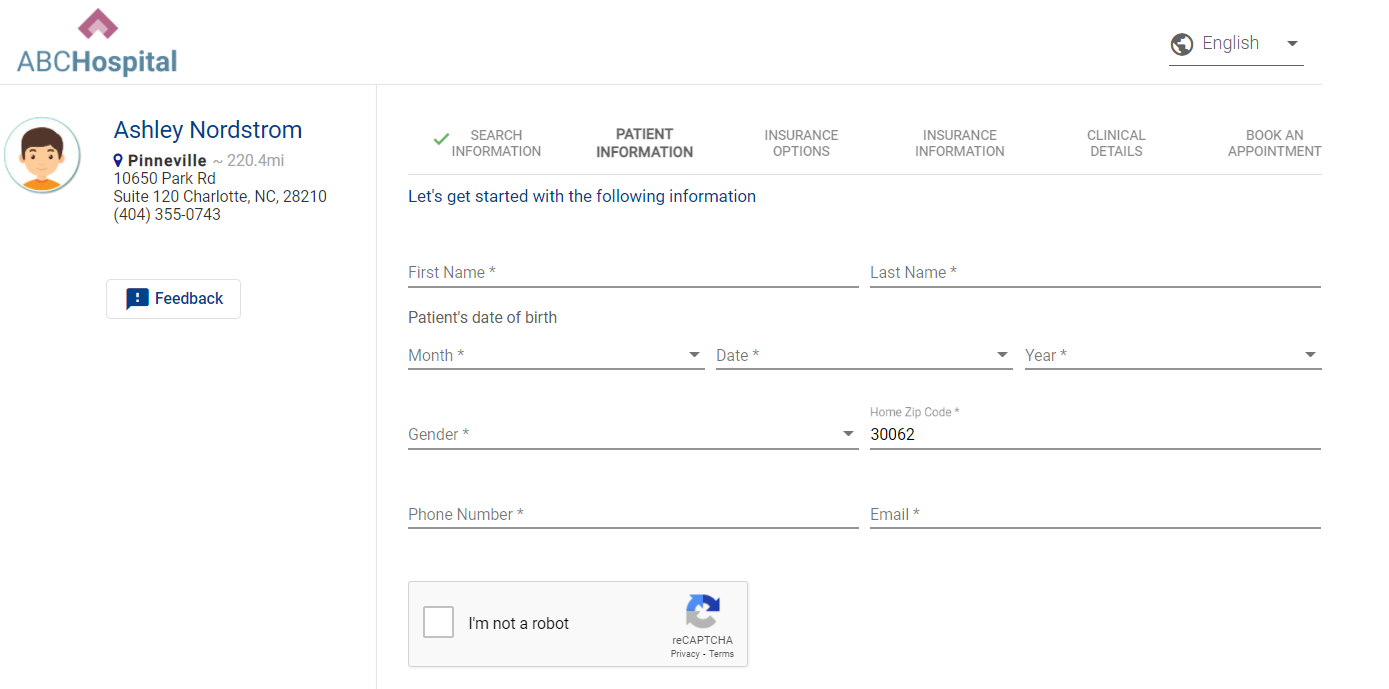
Patient Enters in Demographic Information

Our patient matching algorithm uses a combination of the six pieces of demographic information collected on the first screen.

  • Patient First Name

  • Patient Last Name

  • Date of Birth

  • Patient e-mail address

  • Zip Code

  • Phone Number

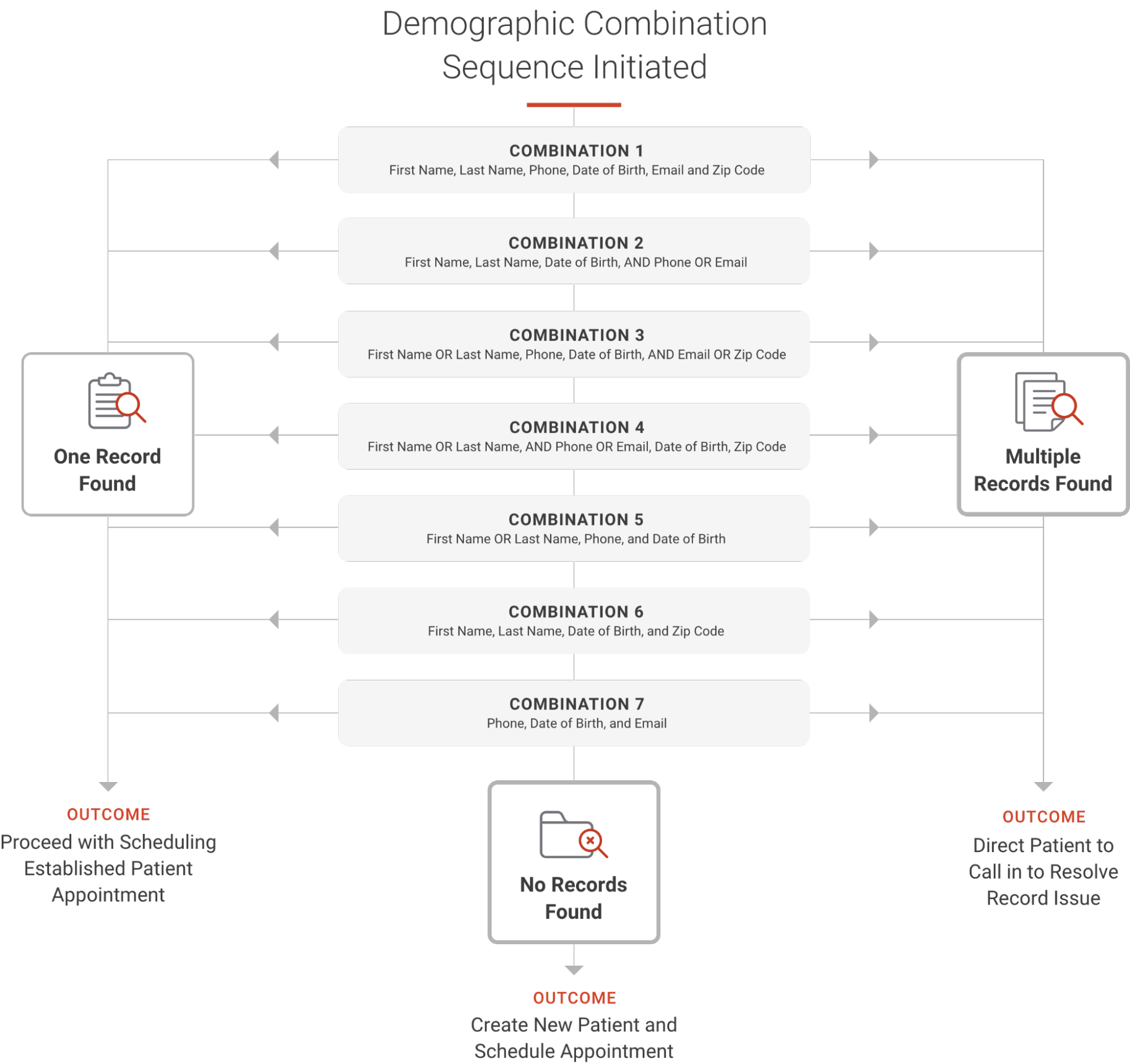
In the logic below, you will see how our algorithm attempts different combinations of the demographic fields. We try seven combinations that can lead to the below results. When we try the first combination, if no record is found, we will try the second combination, and so on until all are complete. We try multiple combinations to ensure we are not erroneously creating new patients.

image2.png

General Info & FAQs

When opening up access to patients, we cannot account for every scenario. Please see the below notes on this algorithm.

  • We do not account for nicknames. We will search for the name that exists on the patient record.

  • When searching across phone numbers, we are searching home, cell, work.

  • We do not reference historical demographic information in our algorithm. For example, if a patient updated their address three months prior, our algorithm cannot reference this information.

  • We do not collect SSN in DASHself. Our data shows that many patients abandon the process due to the risk of this not being secure.

  • This algorithm does not differentiate if any of the fields are NULL or do not contain the data. It requires the appropriate values in the fields. It works when the value is present on the above-mentioned fields.

  • Once the right match is found with the few of the data that are different and are not considered in the algorithm above, the system only updates those values once the patient reaches the last screen and fills in the additional demographic information.

Q: What isn’t accounted for in the patient matching algorithm?

A: The matching is created to account for as many scenarios as possible to reduce the likelihood of duplicate patient entries being created in your system. For example, we do not have the ability to account for misspellings. If a patient accidentally spells their name wrong, there is a risk of a new patient record being created. Additionally, nicknames aren’t included -- just the name existing on the patient record.

Q: What phone numbers are included in the phone matching?

A: Home, cell, and work phone numbers are searched.

Q: Does the algorithm reference historical demographic information?

A: Only current information is searched for matching. For instance, if a patient updated their address three months prior, it’s not referenced in the algorithm.

Q: Do you collect SSNs in DASHself?

A: No, data shows that many patients abandon the process due to a perceived security risk if SSN is requested.

Q: How does the patient matching algorithm respond to empty fields?

A: This algorithm does not differentiate if any of the fields are NULL or do not contain the data. It requires the appropriate values in the fields, matching when the value is present on the above-mentioned fields.

Q: When is the patient’s data actually updated in the system?

A: While the patient enters information early on in the registration process, the patient’s data is not updated until the entire scheduling flow is completed.  This allows for additional information to be collected before updating the patient record.  This is true for both updating a matched patient record as well as when a new (unmatched) record is created.


Need a PDF version to share with your team for training?

DOWNLOAD HERE