

What is the New Patient Flag?
The New Patient flag is a red icon in the DASHcentral scheduling screen that suggests to schedulers which provider should receive the next new patient.
Assignment of the New Patient flag depends on the calculation option selected by the client (see available options below).
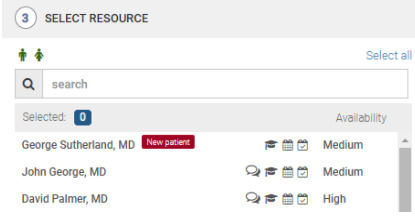
The New Patient Flag feature enables your practice to:
Discontinue manual new patient allocation tracking and assignment - the flag will automatically display for providers who treat the selected chief complaint and age range of the patient
Collect the reason for why a scheduler did not schedule a new patient with the provider with the flag - the flag only serves as a suggestion. If you wish to track why the new patient flag is not being followed, a separate popup question to the scheduler must be configured for this. Answers to the popup can be viewed in PowerBI.
Customize which providers are included in the rotation.
How is the New Patient Flag Calculated?
Practices can choose which calculation meets their needs. Please note that in order for the New Patient Flag distribution methods to have the desired outcome, schedulers should be trained to consistently follow the suggestion.
Option A: Equal Opportunity
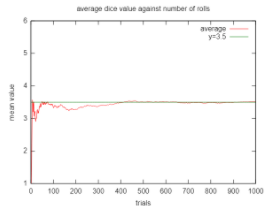
The equal opportunity method is designed and calculated to give each provider an equal number of chances to receive a new patient by randomly assigning the flag to one of the available providers. This distribution method is statistically proven to even out over time. Providers with availability to see more patients (based on fewer restrictions from chief complaints, provider preferences, etc.) may be favored because they will appear in the list of eligible providers more often, and therefore have more chances to be assigned the flag.
Considerations:
Randomization takes time for the new patient flag distribution to even out, and short term surpluses or shortages can occur.
Option B: Equal Distribution
The equal distribution evaluation is designed to provide each provider with the same percentage of new patients coming into the practice. Based on the providers’ schedules, the provider with the lowest percentage of future new patients is assigned the New Patient flag to help balance out the distribution among the entire practice. In short, Provider A has 3 new patients on her schedule and Provider B only has 2, the flag will be assigned to Provider B to allow equal distribution of new patients.
Considerations:
Providers with a high number of new patient referrals will not be highlighted with the New Patient flag as often as other providers. Additionally, providers with more restrictive template rules may be highlighted more often because their percentage of new patients may be lower. This method is preferable for practices attempting to standardize rules.