

DASH 21.1 Service Pack #2 contains bug fixes and minor enhancements for the DASHcentral, DASHself, and Dashin applications. Please contact your Client Success Manager with any questions.
DASHcentral
Guarantor / Subscriber Enhancements
Made the following enhancements to the system logic for managing Guarantor and Subscriber information:
The user will be able to auto-populate information in the Guarantor Details section of the Patient Demographics page if the guarantor is an existing person in the system. The user can either select the “Same as Patient” radio button; or perform a search for an existing person.
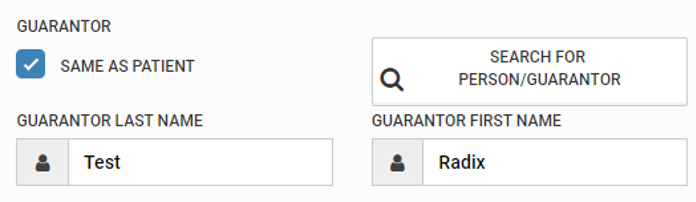
The patient insurance details will have the following toggle buttons to select the subscriber:
Subscriber Search: the user can search a person’s name if the subscriber is an existing person in the system.
New: Selecting this option will clear the subscriber information fields and allow the user to key-enter new details.
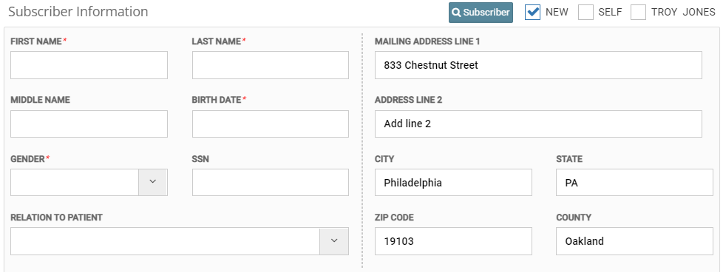
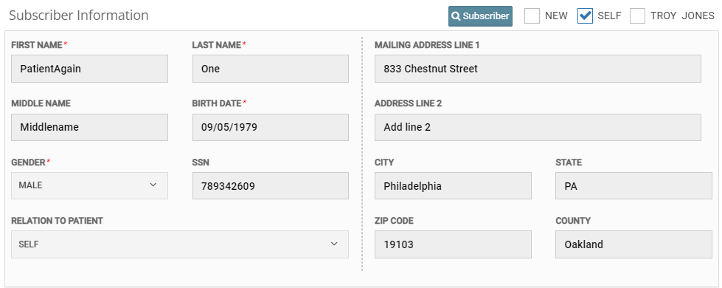
Self: The user may check this option if the subscriber is the same as the currently selected patient. Note that selecting this option will lock the Subscriber Information fields from editing.
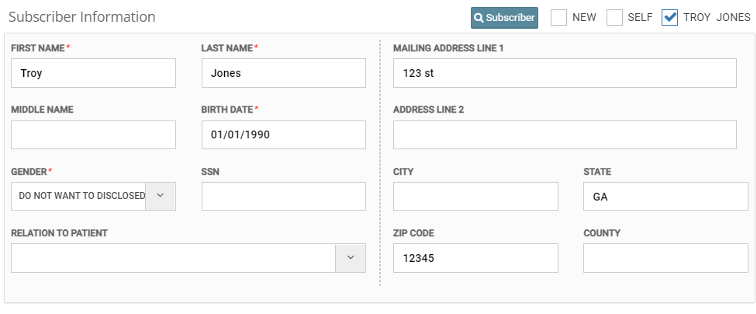
Guarantor: If guarantor information is present in the patient’s Demographics, the user may select this option if the guarantor is also the subscriber.
Task List Bug Fixes & Enhancements
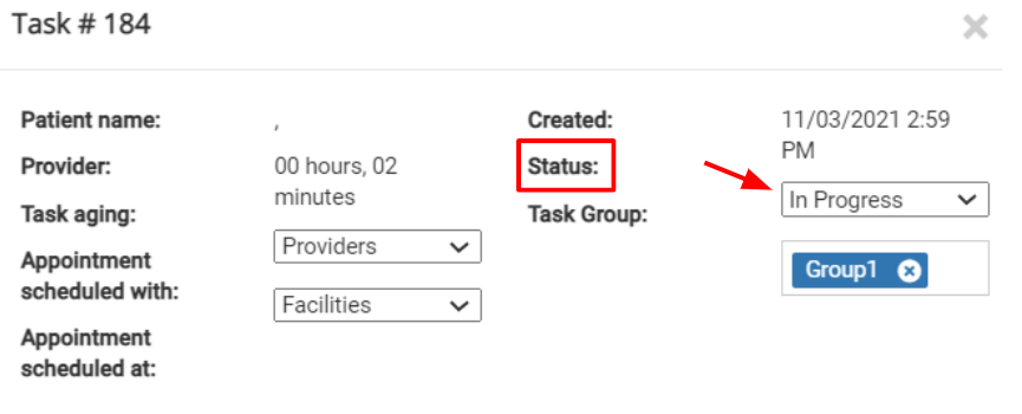
Repaired a bug so that the Task List can now be filtered by the 'Cancelled' status.
Previously selected filter conditions in the Task List will now be retained in the 'Search' modal for a user session.
Fixed a minor issue that occasionally caused Task status updates to fail.
Patient Instructions Alert Screen Bug Fix
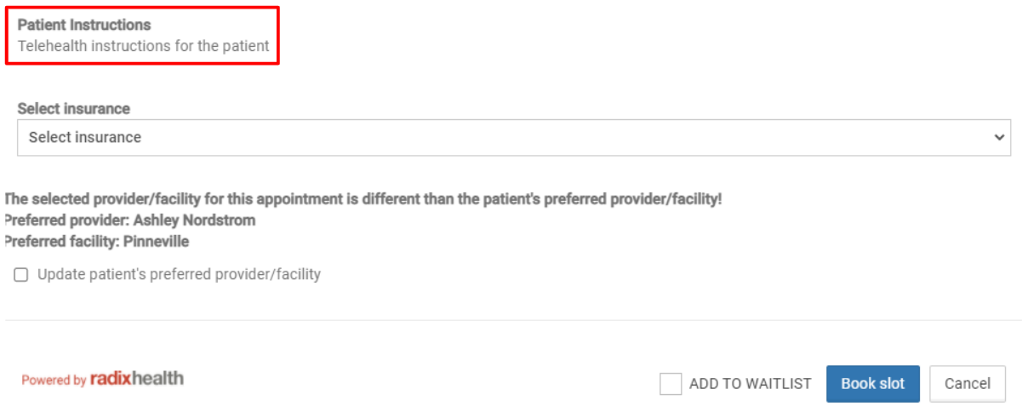
Repaired a bug to ensure that Patient Instructions will now display consistently on the Appointment Confirmation page for Telehealth appointments.
Self-configuration Enhancements and Bug Fixes
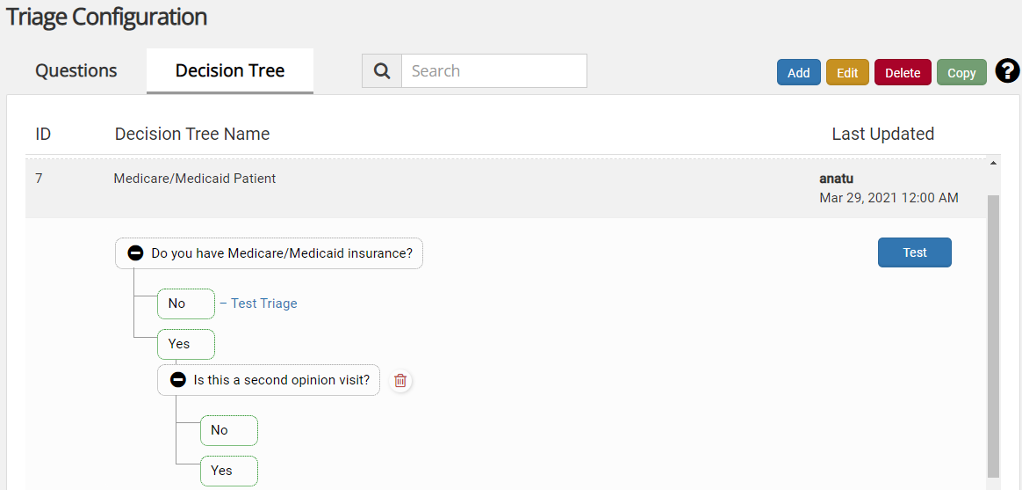
Decision Trees created for Triage will now render correctly in the user interface, and will no longer display an error when Decision Tree ID is selected.
Repaired a bug that was causing a blank page when search for a provider in the Resource Template section of the Configuration menu.
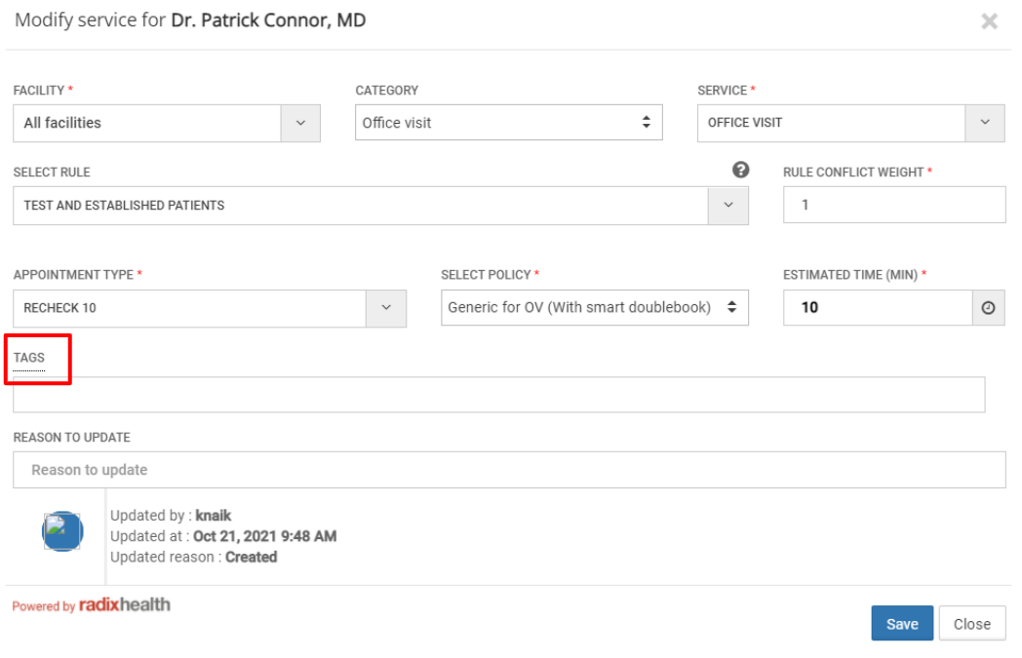
Fixed a UI bug in the 'Tag' field on the Central > Configuration > Resource Service page. The overlapping boxes above the field are now removed.
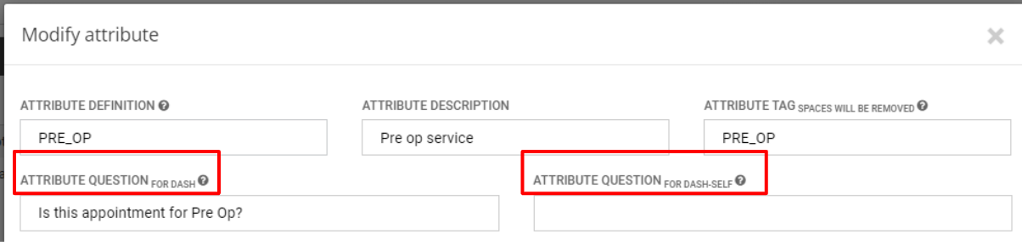
The character limit for the fields “Attribute Question For DASH” and Attribute Question For DASHself” on the Preference Attribute screen has been increased from 100 to 200, in order to allow for the configuration of lengthier pop up questions/preferences.
Central Scheduling: Ease-of-Use Enhancements and Bug Fixes
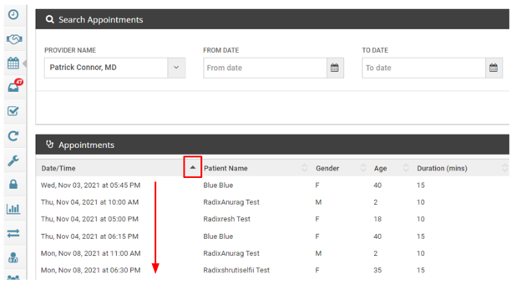
A change has been made to the listing order of appointments on the View Appointments page. Sorting the appointments in 'ascending' order will list all the AM appointments for a given day, followed by the PM appointments. Sorting the appointments in 'descending' order will list all the PM appointments for a given day, followed by the AM appointments. When appointments for multiple days are viewed, sorting in ascending order will follow the 'From-date AM' to 'To-Date PM' sequence.
When rescheduling an appointment, the selected Specialty from the originally scheduled appointment will be retained. The resulting provider list will thus be limited only to providers in that specialty, instead of defaulting to “All.”
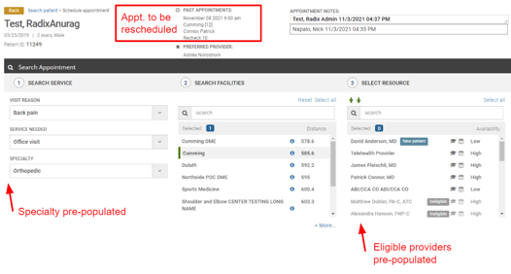
Repaired an issue causing duplication of the “Ineligible” label against provider names on the Appointment Scheduling screen.
DASHself
User Interface Improvements
The Google Maps icon will no longer display on the appointment confirmation screen for telehealth appointments.
Repaired a bug that was preventing the patient’s preferred facility from displaying consistently across all self-scheduling steps.
The “Payment” option will no longer be displayed from the top screen menu when not applicable.
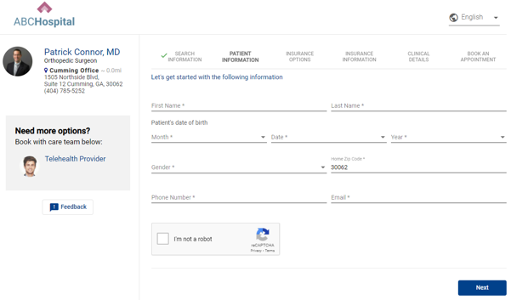
Removed the “Previous” button from the Patient Information screen.
User Experience Improvements
Repaired a bug that was forcing some patients to re-enter their insurance information when navigating to a prior step in the scheduling process, even if no updates were required.
Repaired a bug that caused the Insurance Information screen to be bypassed if the patient navigates back and makes a revision to information in the Patient Information screen.
Repaired a bug that was causing unpopulated non-mandatory fields to prevent the patient from progressing through the scheduling process.
If the patient selects a facility from the drop-down list, that location will now display consistently as the primary facility on the provider search screen.
If a patient selects a Specialty from their initial DASHself search, they will now be prompted to indicate a Visit Reason after choosing their provider from the resulting screen. This change simplifies the search process and avoids the risk of patient confusion.
Communications Consent Bug Fix
A bug was found that caused self-scheduled patients who did not check the communications consent box at the time of scheduling, but who had already granted consent when their patient record was created in the EHR, to have their consent status set to “No.” This has been resolved so that if a client leaves the communications consent fields blank at the time of scheduling, no update will be made to their patient record.
Appointment Date & Time Bug Fix
Fixed a bug to ensure that appointment date & time information matches correctly across all communication modes.
Linked Providers Improvements
DASHself logic for auto-selecting associated providers (i.e., PA with MD, or vice versa) will now be consistent with the equivalent logic in DASHcentral.
Repaired a bug to ensure that MDs or PAs with multiple linked providers will have all linked providers displayed in DASHself
DASHin
Signature Page user interface
Mobile & tablet user interface updates:
The patient will be prompted to both type their name, as well as provide a digital signature using the touchscreen.
A consent checkbox will be displayed below the signature box field with an asterisk requiring the patient to complete this portion prior to proceeding.
If the patient does not both type and sign their name, the field background will be highlighted in red and instructions will be displayed to the patient as follows: “Please make sure you provide your signature. You will need to fill out all the forms again if your signature is missing.”
Patients will not be permitted to type as an alternative to free-hand signing on mobile devices.
For witness signatures, the user will still have to type their name into a text field. This typed response will also be added to the PDF.
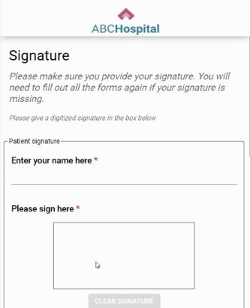
Desktop user interface update:
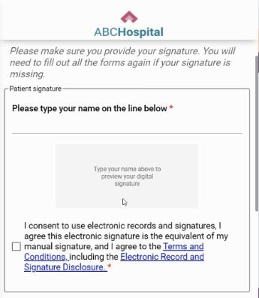
The patient will be prompted to type their name. A text box below this space will display a preview of their digital signature.
The digital signature will only be editable by changing the typed text.
A consent checkbox will be displayed below the signature box field with an asterisk requiring the patient to complete this portion prior to proceeding.
If the patient does not both type and sign their name, the field background will be highlighted in red and instructions will be displayed to the patient as follows: “Please make sure you provide your signature. You will need to fill out all the forms again if your signature is missing.”
A similar process will be followed for the witness signature. The prompt will read “Please have your witness type their name on the line below.”
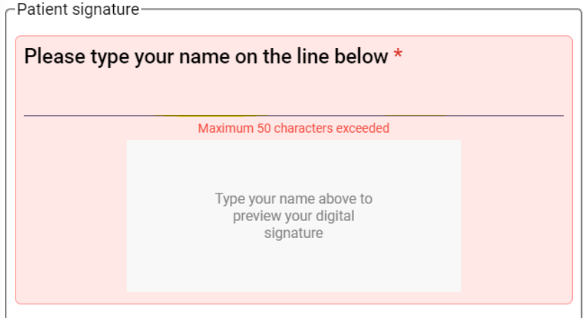
The patient will be shown an error message if they type more than 50 characters in the space for their name on mobile, tablet, and desktop formats.
The “Next” button is clickable, as on previous DASHin screens, but will be disabled until all required portions of the form have been completed.
If any required fields are unanswered, a notification will prompt the patient to “Please fill in all required fields.”
Once the form has been completed, the next button will show “Next” when the user hovers over it.
Check-in Process Bug Fix
Patients will not be prevented from advancing through the check-in process due to non-essential errors such as logos not displaying.
Patient Experience Improvements
Fixed an issue causing conditional questions to display in one long sequence. Conditional questions will now each display on a new text line.
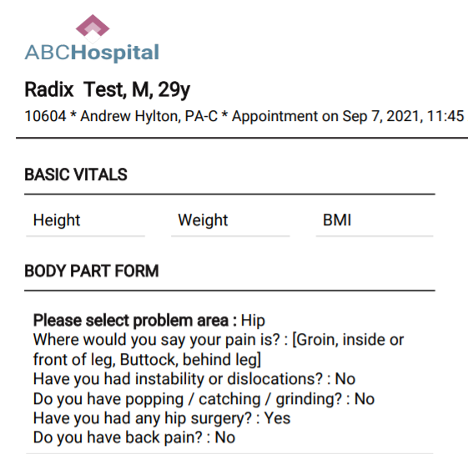
Updated the rendering of "Yes" and "No" radio button responses in the DASHin PDF.

Previous Format

New Format
Improved error messages for brevity and clarity to enable easy remediation.
Fixed a spelling error on the DASHin Terms & Conditions page.
Check-in Staff Ease-of-Use Improvements
Repaired a bug to prevent a token from being generated if there are no attached forms.
Conditional questions will now be suppressed from the check-in PDF if the patient answers "No" to the parent question.
Integrations
ECW
Added an enhancement that allows for newly added referring providers in eCW to update consistently in DASH.
Fixed an issue with eCW integrations that was causing slots to be improperly booked on some providers’ schedules.
Allscripts
Made a fix to Allscripts integrations for APM patient syncing to correctly store patient balances when either positive or negative.
Athena
Updated Athena integrations to modify handling of exceptional cases where Deleted status patient records in one department caused the patient record to become inactivated during check-in.